MyNet: Vibecoded Networking Motivation App
MyNet: Vibecoded Networking Motivation App
MyNet: Vibecoded Networking Motivation App
An intuitive app prototype that makes tracking your connections simple with clear visual design, smart follow-up reminders, and gamification
ෆ Vibecoded with Lovable ෆ
An intuitive app prototype that makes tracking your connections simple with clear visual design, smart follow-up reminders, and gamification ෆ Vibecoded with Lovable ෆ
An intuitive app prototype that makes tracking your connections simple with clear visual design, smart follow-up reminders, and gamification ෆ Vibecoded with Lovable ෆ
Role
UX Designer
Role
UX Designer
Role
UX Designer
Duration
6 Hours
Duration
6 Hours
Duration
6 Hours
Team
Me, Myself, and I
Team
Me, Myself, and I
Team
Me, Myself, and I
Responsibility
Vibecoding・Visual Element Curation
Responsibility
Vibecoding・Visual Element Curation
Responsibility
Vibecoding・Visual Element Curation
BACKGROUND
BACKGROUND
BACKGROUND
After moving to New York City to build both a career and a life, I realized how essential networking is. Yet with so many events, it was hard to track who I met, what we discussed, and how to follow up. At the same time, the rise of AI and “vibecoding” trends inspired me to experiment with AI prototyping tools—leading me to create this project to explore both networking challenges and new design possibilities.
After moving to New York City to build both a career and a life, I realized how essential networking is. Yet with so many events, it was hard to track who I met, what we discussed, and how to follow up. At the same time, the rise of AI and “vibecoding” trends inspired me to experiment with AI prototyping tools—leading me to create this project to explore both networking challenges and new design possibilities.
After moving to New York City to build both a career and a life, I realized how essential networking is. Yet with so many events, it was hard to track who I met, what we discussed, and how to follow up. At the same time, the rise of AI and “vibecoding” trends inspired me to experiment with AI prototyping tools—leading me to create this project to explore both networking challenges and new design possibilities.
PROBLEM
PROBLEM
PROBLEM
How might we turn the messy chaos of networking into a
fun, visual experience that motivates people to stay connected?
How might we turn the messy chaos of networking into a fun, visual experience that motivates people to stay connected?
How might we turn the messy chaos of networking into a fun, visual experience that motivates people to stay connected?
APPROACH
APPROACH
APPROACH
I experimented with several AI prototyping tools—including Figma Make, Claude, Banani, and Lovable—to evaluate their visual design style and alignment with the project’s scope and budget. After testing early outputs, I chose Lovable as the most effective platform for building this concept. (I can share more about tool comparisons during interviews if helpful.)
I experimented with several AI prototyping tools—including Figma Make, Claude, Banani, and Lovable—to evaluate their visual design style and alignment with the project’s scope and budget. After testing early outputs, I chose Lovable as the most effective platform for building this concept. (I can share more about tool comparisons during interviews if helpful.)
I experimented with several AI prototyping tools—including Figma Make, Claude, Banani, and Lovable—to evaluate their visual design style and alignment with the project’s scope and budget. After testing early outputs, I chose Lovable as the most effective platform for building this concept. (I can share more about tool comparisons during interviews if helpful.)
PROCESS
PROCESS
PROCESS
Step 1: Generate a Project Vision Brief with ChatGPT
I put my rough, unorganized idea into ChatGPT and asked it to create a project vision brief. The result was a clear, structured document, shown in the images below.
Step 1: Generate a Project Vision Brief with ChatGPT
I put my rough, unorganized idea into ChatGPT and asked it to create a project vision brief. The result was a clear, structured document, shown in the images below.
Step 1: Generate a Project Vision Brief with ChatGPT
I put my rough, unorganized idea into ChatGPT and asked it to create a project vision brief. The result was a clear, structured document, shown in the images below.
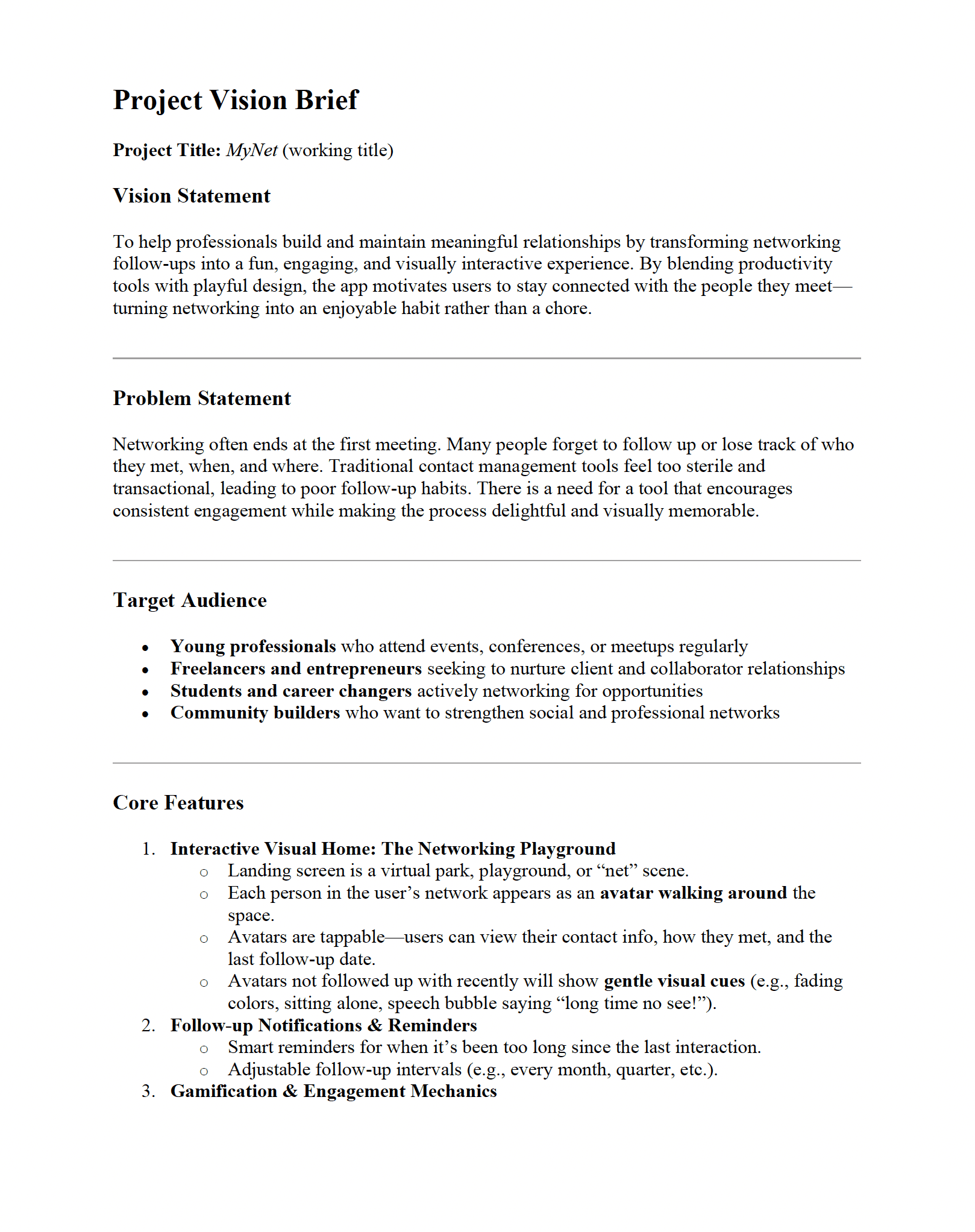
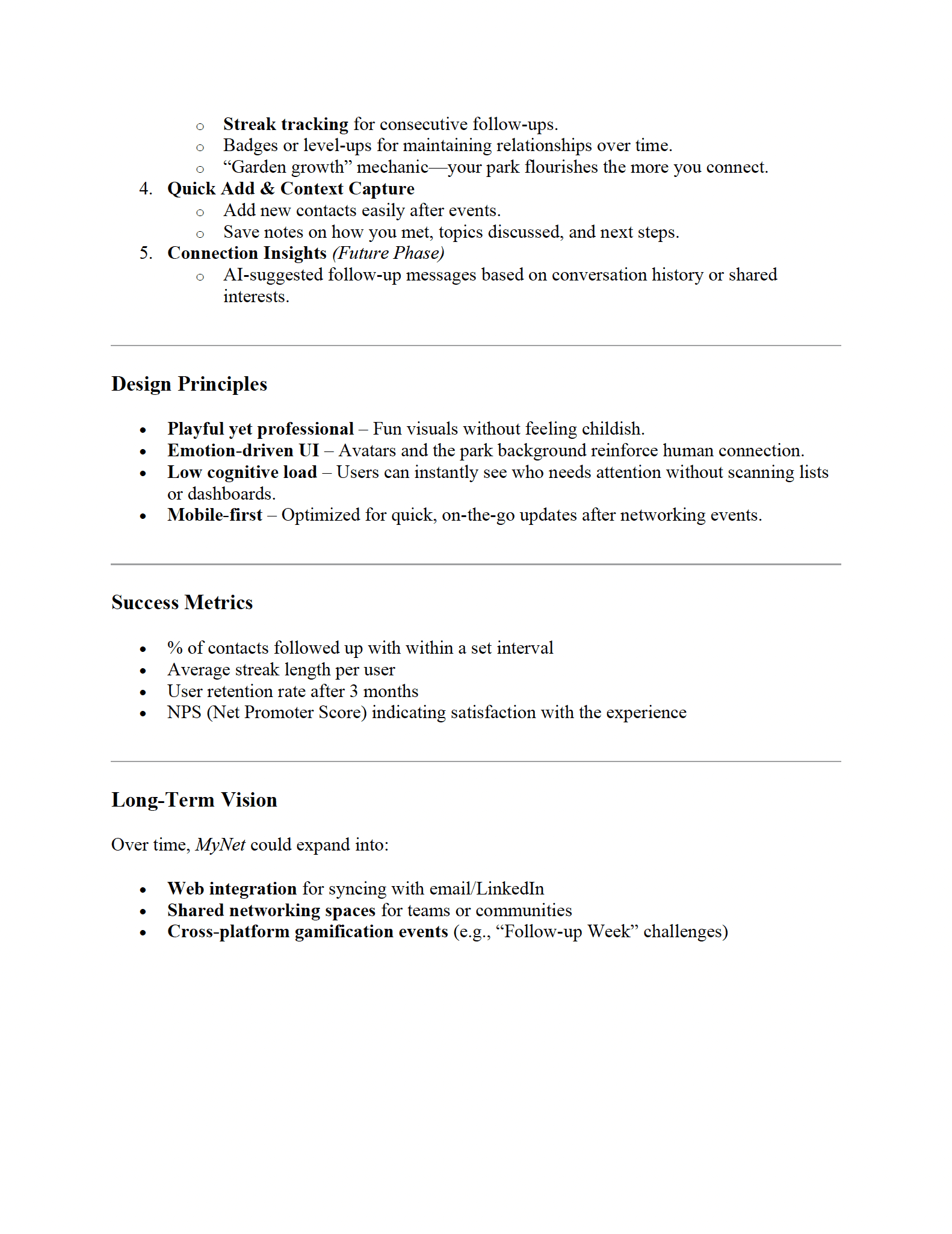
Project Vision Brief generated by ChatGPT
Project Vision Brief generated by ChatGPT
Step 2: Build the first version using AI prototyping tools
I imported the project vision brief into Figma Make, Claude, and Lovable. After weighing the pros and cons, I chose Lovable as the tool to further develop my project.
Step 2: Build the first version using AI prototyping tools
I imported the project vision brief into Figma Make, Claude, and Lovable. After weighing the pros and cons, I chose Lovable as the tool to further develop my project.
Step 2:
Build the first version using AI prototyping tools
I imported the project vision brief into Figma Make, Claude, and Lovable. After weighing the pros and cons, I chose Lovable as the tool to further develop my project.
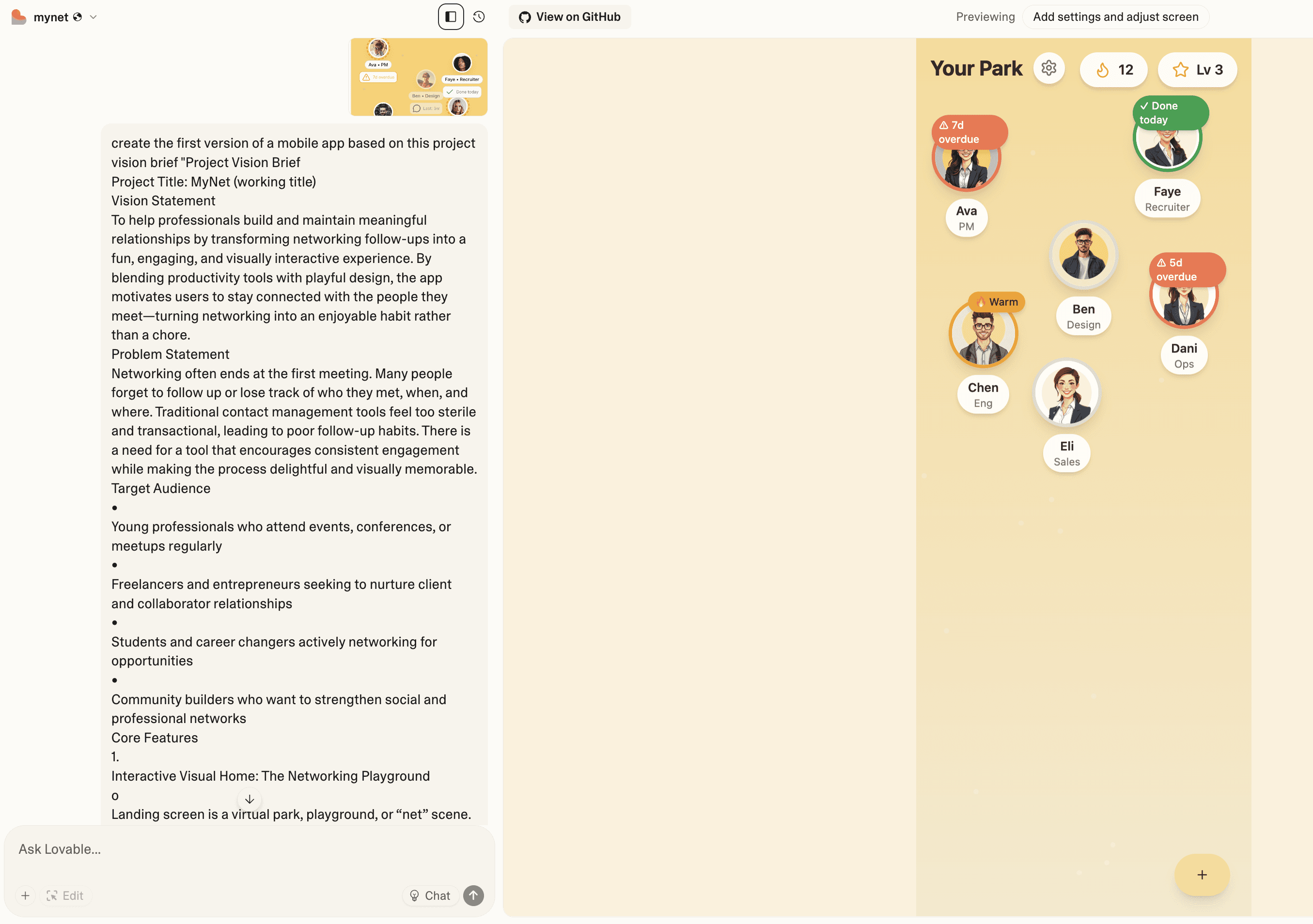
First version of MyNet generated by Lovable
First version of MyNet generated by Lovable
First version of MyNet generated by Lovable
Step 3: Refine with curated visual elements and prompts
After generating dozens of versions, I refined the prototype by prompting Lovable with manually curated visual elements—such as avatars, backgrounds, and a cohesive color palette. I also introduced new features and refined underdeveloped ones to better align with my vision and improve usability.
Step 3: Refine with curated visual elements and prompts
After generating dozens of versions, I refined the prototype by prompting Lovable with manually curated visual elements—such as avatars, backgrounds, and a cohesive color palette. I also introduced new features and refined underdeveloped ones to better align with my vision and improve usability.
Step 3:
Refine with curated visual elements and prompts
After generating dozens of versions, I refined the prototype by prompting Lovable with manually curated visual elements—such as avatars, backgrounds, and a cohesive color palette. I also introduced new features and refined underdeveloped ones to better align with my vision and improve usability.
FEATURES
FEATURES
FEATURES
Feature #1:
Easy Status Tracking
The app makes it simple for users to monitor and manage their networking activity through a clear, minimal visual system. Status icons provide instant feedback: a red warning icon highlights connections needing a follow-up, a green check confirms a recent follow-up, and a fire icon celebrates streaks of consistent engagement.
Within the interactive digital playground, users can tap on avatars to quickly check follow-up status and send a message in one click—seamlessly linking to their LinkedIn account. Tapping further into an avatar reveals richer context, including when and where the connection was made, personal notes, and suggested next actions.
Why it matters: Users gain at-a-glance awareness of their networking health, reducing the mental load of remembering follow-ups and making it easier to sustain meaningful professional relationships.
Feature #1:
Easy Status Tracking
The app makes it simple for users to monitor and manage their networking activity through a clear, minimal visual system. Status icons provide instant feedback: a red warning icon highlights connections needing a follow-up, a green check confirms a recent follow-up, and a fire icon celebrates streaks of consistent engagement.
Within the interactive digital playground, users can tap on avatars to quickly check follow-up status and send a message in one click—seamlessly linking to their LinkedIn account. Tapping further into an avatar reveals richer context, including when and where the connection was made, personal notes, and suggested next actions.
Why it matters: Users gain at-a-glance awareness of their networking health, reducing the mental load of remembering follow-ups and making it easier to sustain meaningful professional relationships.
Feature 3:
Adjustable Follow-Up Frequency
Through the bottom-left settings button, users can personalize how often they’d like to follow up with each connection. The system then recalculates and updates follow-up statuses automatically. Users can also choose whether to receive notifications when a follow-up is due and customize how avatars behave in the playground, such as whether they move around dynamically.
Why it matters: By giving users control over frequency and notifications, the app adapts to different networking styles—whether someone prefers regular check-ins or more flexible interactions—making the experience feel personal and sustainable.
Feature 1:
Easy Status Tracking
The app makes it simple for users to monitor and manage their networking activity through a clear, minimal visual system. Status icons provide instant feedback: a red warning icon highlights connections needing a follow-up, a green check confirms a recent follow-up, and a fire icon celebrates streaks of consistent engagement.
Within the interactive digital playground, users can tap on avatars to quickly check follow-up status and send a message in one click—seamlessly linking to their LinkedIn account. Tapping further into an avatar reveals richer context, including when and where the connection was made, personal notes, and suggested next actions.
Why it matters: Users gain at-a-glance awareness of their networking health, reducing the mental load of remembering follow-ups and making it easier to sustain meaningful professional relationships.
Feature 2:
Quick Add Contact
With a single tap on the bottom-right add button, users can instantly capture new connections. The streamlined form makes it easy to log essential details—such as role, avatar, LinkedIn profile, meeting time and location, and personal notes—within seconds.
Why it matters: By reducing friction in the documentation process, users can preserve fresh context and ensure no valuable connection slips through the cracks.
Feature #2:
Quick Add Contact
With a single tap on the bottom-right add button, users can instantly capture new connections. The streamlined form makes it easy to log essential details—such as role, avatar, LinkedIn profile, meeting time and location, and personal notes—within seconds.
Why it matters: By reducing friction in the documentation process, users can preserve fresh context and ensure no valuable connection slips through the cracks.
Feature #2:
Quick Add Contact
With a single tap on the bottom-right add button, users can instantly capture new connections. The streamlined form makes it easy to log essential details—such as role, avatar, LinkedIn profile, meeting time and location, and personal notes—within seconds.
Why it matters: By reducing friction in the documentation process, users can preserve fresh context and ensure no valuable connection slips through the cracks.
Feature #3:
Adjustable Follow-Up Frequency
Through the bottom-left settings button, users can personalize how often they’d like to follow up with each connection. The system then recalculates and updates follow-up statuses automatically. Users can also choose whether to receive notifications when a follow-up is due and customize how avatars behave in the playground, such as whether they move around dynamically.
Why it matters: By giving users control over frequency and notifications, the app adapts to different networking styles—whether someone prefers regular check-ins or more flexible interactions—making the experience feel personal and sustainable.
Feature #3:
Adjustable Follow-Up Frequency
Through the bottom-left settings button, users can personalize how often they’d like to follow up with each connection. The system then recalculates and updates follow-up statuses automatically. Users can also choose whether to receive notifications when a follow-up is due and customize how avatars behave in the playground, such as whether they move around dynamically.
Why it matters: By giving users control over frequency and notifications, the app adapts to different networking styles—whether someone prefers regular check-ins or more flexible interactions—making the experience feel personal and sustainable.
PROTOTYPE
PROTOTYPE
PROTOTYPE
LEARNINGS
LEARNINGS
LEARNINGS
AI and the Future of UX Design
I was amazed by the efficiency boost from using AI prototyping tools—this entire process only took me about six hours, most of which went into curating visual elements. If the goal were only functionality, it would have taken far less. This experience made me wonder: how will the role of a UX designer evolve with AI? How can I differentiate myself in the future, and what skills and qualities will the industry value most?
Vibecoding as Creative Play
Beyond those concerns, I found the vibecoding process incredibly fun. These tools, though powerful, also unlock our imagination by making it possible to quickly visualize ideas that might otherwise stay abstract. By removing development barriers, they can actually spark creativity. How will democratizing the ability to create digitally shape what we design? It’s unpredictable—but also exciting.
AI and the Future of UX Design
I was amazed by the efficiency boost from using AI prototyping tools—this entire process only took me about six hours, most of which went into curating visual elements. If the goal were only functionality, it would have taken far less. This experience made me wonder: how will the role of a UX designer evolve with AI? How can I differentiate myself in the future, and what skills and qualities will the industry value most?
Vibecoding as Creative Play
Beyond those concerns, I found the vibecoding process incredibly fun. These tools, though powerful, also unlock our imagination by making it possible to quickly visualize ideas that might otherwise stay abstract. By removing development barriers, they can actually spark creativity. How will democratizing the ability to create digitally shape what we design? It’s unpredictable—but also exciting.
AI and the Future of UX Design
I was amazed by the efficiency boost from using AI prototyping tools—this entire process only took me about six hours, most of which went into curating visual elements. If the goal were only functionality, it would have taken far less. This experience made me wonder: how will the role of a UX designer evolve with AI? How can I differentiate myself in the future, and what skills and qualities will the industry value most?
Vibecoding as Creative Play
Beyond those concerns, I found the vibecoding process incredibly fun. These tools, though powerful, also unlock our imagination by making it possible to quickly visualize ideas that might otherwise stay abstract. By removing development barriers, they can actually spark creativity. How will democratizing the ability to create digitally shape what we design? It’s unpredictable—but also exciting.
Brooklyn, NY
Brooklyn, NY
Brooklyn, NY